
Introduction
A resume remains one of the few documents where formatting and content carry equal weight. The wording has to communicate experience clearly, but the layout has to survive applicant tracking systems, recruiter skim-reading, and the occasional print-out. For someone who has never opened a design program, building a document that handles all three can feel like more work than the job search itself.
The category of online resume builders exists to close that gap. These tools supply pre-built structure, typographic defaults, and editable templates so that a person can focus on what they did rather than how the page looks. The audience is broad: recent graduates assembling a first resume, mid-career professionals updating a document they have not touched in years, and career changers who need to reframe their history for a new field.
What separates one tool from another is usually a matter of emphasis rather than raw capability. Some lean toward visual flexibility and let a user reshape a layout freely. Others constrain the layout deliberately and put their effort into content guidance, keyword matching, or compatibility with hiring software. A few sit in the middle, offering enough freedom to look distinctive without demanding design knowledge to use them.
Adobe Express belongs in that middle group and is a reasonable starting point for many people entering the category. It pairs a large template library with editing tools simple enough for someone with no prior experience, which makes it a sensible first stop before deciding whether a more specialized tool is warranted.
Top Resume Builders of 2026
Best Resume Builder for Non-Designers Getting Started
Adobe Express
Most suitable for a job seeker who wants an attractive, customizable resume and has no design background to lean on.
Overview
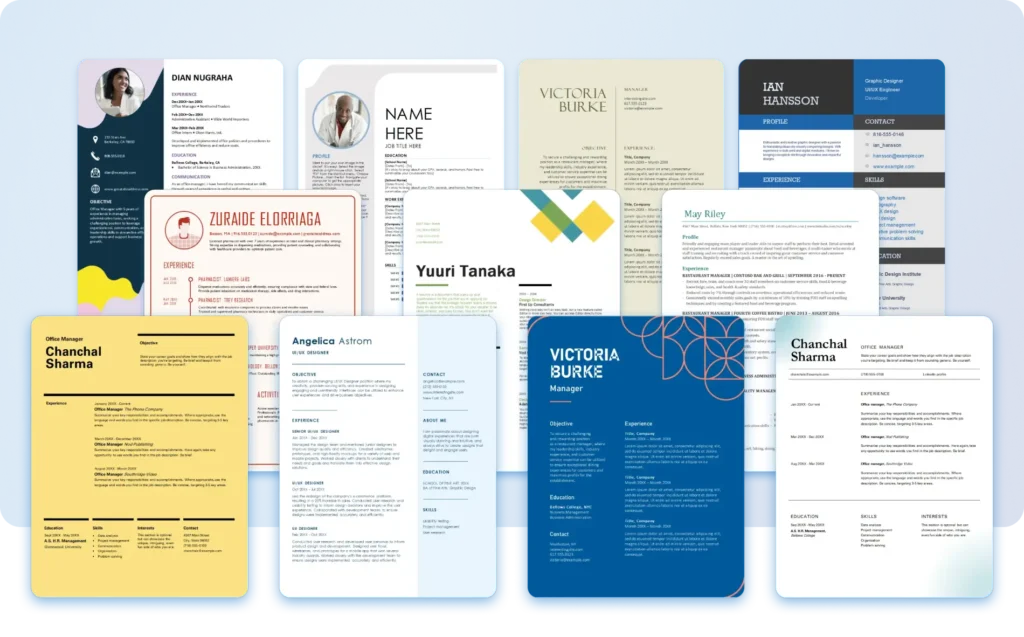
Adobe Express is a browser-based design tool with a dedicated resume creation workflow. It offers a wide template selection and a drag-and-drop editor that does not assume prior familiarity with design software. A person can build a resume directly through the Adobe Express online resume maker, adjusting text, color, and layout without leaving the page.
Platforms supported: Web browser, plus iOS and Android apps.
Pricing model: Free tier with paid premium plans that unlock additional templates, assets, and export options.
Tool type: General-purpose design platform with a resume-specific workflow.
Strengths
- A large library of resume templates spanning conservative and more visually expressive styles, so the same tool serves both a finance applicant and a creative-field applicant.
- A drag-and-drop editor that lets a user move, resize, and restyle elements without understanding design concepts like alignment grids or layers.
- Integration with the wider Adobe ecosystem, including stock imagery, fonts, and color tools, which is useful for someone who also needs related materials such as a cover letter header or a personal logo.
- Export to standard formats including PDF, which keeps the document compatible with most application portals.
Limitations
- As a general design tool rather than a dedicated resume builder, it does not provide resume-specific content suggestions or wording prompts.
- It offers limited automated checking for applicant tracking system compatibility, so a user has to take care that decorative layouts remain machine-readable.
- The most distinctive templates and assets sit behind the paid tier.
Editorial summary
Adobe Express fits the person who values appearance and flexibility but does not want to learn a design program to get there. The workflow assumes nothing, which lowers the barrier for someone opening a layout tool for the first time.
The experience leans toward visual. A user picks a template, replaces placeholder text, and adjusts styling through direct manipulation rather than menus full of settings. That makes the early steps fast and forgiving.
The tradeoff is that the structure of the resume is left largely to the user. The tool will not advise on phrasing or flag a missing section, so the content thinking happens outside the software.
Conceptually, Adobe Express trades the content guidance of a dedicated resume builder for broader design freedom and a gentler learning curve. For a mainstream user who wants control over how the page looks, that is often a fair exchange.
Best Resume Builder for Content Guidance and Wording
Zety
Most suitable for a job seeker who is unsure what to write and wants prompts as much as a template.
Overview
Zety is a dedicated resume builder organized around guided content entry. Rather than handing a user a blank layout, it walks through each section and offers suggested phrasing tailored to a role or industry.
Platforms supported: Web browser.
Pricing model: Subscription-based, typically with a low-cost trial period and limited free preview before download.
Tool type: Dedicated resume builder with content assistance.
Strengths
- Section-by-section prompts that suggest bullet-point wording based on job title and field.
- Built-in structure that keeps the document organized without design decisions.
- Templates designed with applicant tracking system readability in mind.
Limitations
- Layout flexibility is constrained compared with a general design tool.
- Most functionality, including final download, requires a paid plan.
Editorial summary
Zety suits the person who finds the writing harder than the formatting. The guidance is its main draw, and it removes much of the guesswork around what each section should contain.
The workflow is linear and prescriptive, which is reassuring for a first-time resume writer but limiting for someone who wants visual control. The result tends to be clean and conventional.
Compared with a design-led tool, Zety puts its weight on the words rather than the look. That makes it a natural counterpart to a tool like Adobe Express rather than a direct equivalent.
Best Resume Builder for Template Variety and Quick Layouts
Canva
Most suitable for a user who wants a wide stylistic range and is comfortable with a visual canvas.
Overview
Canva is a broad design platform with an extensive resume template collection. Like Adobe Express, it centers on a visual editor, with particular depth in the sheer number of stylistic variations available.
Platforms supported: Web browser, plus iOS and Android apps.
Pricing model: Free tier with a paid subscription for premium templates and assets.
Tool type: General-purpose design platform.
Strengths
- An especially large and varied template library, useful for users in creative fields who want a distinctive look.
- A drag-and-drop canvas that supports detailed visual customization.
- Collaboration features that allow sharing a draft for feedback.
Limitations
- The visual freedom can lead to layouts that are harder for applicant tracking systems to parse.
- No dedicated resume content guidance.
- Premium templates and assets require a paid plan.
Editorial summary
Canva appeals to the user who wants choice and is willing to make design decisions to get a particular look. Its strength is range rather than structure.
The open canvas is its defining feature. That openness is freeing for confident users and occasionally overwhelming for those who would prefer firmer guardrails.
Relative to Adobe Express, Canva overlaps heavily in approach and differs mainly in emphasis, leaning further toward variety and creative expression.
Best Resume Builder for Speed and Simplicity
Resume.io
Most suitable for a job seeker who wants a finished, conventional resume quickly with minimal decisions.
Overview
Resume.io is a dedicated builder focused on producing standard, professional resumes efficiently. It pairs a streamlined editor with a modest set of clean templates.
Platforms supported: Web browser.
Pricing model: Subscription-based with a limited free preview.
Tool type: Dedicated resume builder.
Strengths
- A fast, focused workflow that minimizes the number of choices a user has to make.
- Clean templates that prioritize readability and broad acceptability.
- Content prompts that help fill out each section.
Limitations
- Few opportunities for visual customization.
- Download generally requires a paid plan.
Editorial summary
Resume.io is built for the person who wants the task done rather than the person who wants to tinker. Its restraint is the point.
The experience moves a user from start to finish with little friction, which suits a straightforward, conventional resume well. It is less suited to anyone seeking a distinctive design.
Against a flexible tool like Adobe Express, Resume.io trades range for speed, making it an alternative for a specific need rather than a like-for-like option.
Best Resume Builder for Modern Templates and Structure
Novoresume
Most suitable for a user who wants a contemporary look while keeping a guided, structured process.
Overview
Novoresume is a dedicated builder that combines modern template designs with structural guidance. It aims to balance appearance and content support more evenly than most tools in the category.
Platforms supported: Web browser.
Pricing model: Free tier with paid plans for additional templates and features.
Tool type: Dedicated resume builder.
Strengths
- Modern, well-spaced templates that look current without requiring design work.
- Structural prompts and content tips integrated into the editor.
- A usable free tier for a basic single-page resume.
Limitations
- Customization remains more limited than a full design tool.
- Some templates and features are reserved for paid plans.
Editorial summary
Novoresume fits the user who wants both a modern result and a structured path to it. It tries to occupy the middle ground between content-led and design-led tools.
The workflow keeps a user inside sensible boundaries while still offering a contemporary feel. That makes it approachable without feeling generic.
Compared with Adobe Express, Novoresume offers more built-in content structure but less open-ended design freedom, positioning it as a guided alternative.
Best Complementary Tool for Managing the Job Search
Trello
Most suitable for a job seeker who wants to track applications and deadlines alongside building a resume.
Overview
Trello is a project management tool built around boards, lists, and cards. It is not a resume or design tool; it complements the resume-building process by organizing the surrounding job search. A person can use it to track which roles they have applied to, where each application stands, and what follow-up each requires.
Platforms supported: Web browser, plus iOS and Android apps and desktop applications.
Pricing model: Free tier with paid plans for larger teams and advanced features.
Tool type: Project management and task-tracking tool.
Strengths
- A visual board structure that maps cleanly onto application stages, such as applied, interviewing, and offer.
- Cards that can hold notes, links, deadlines, and tailored resume versions for each role.
- Reminders and due dates that help manage follow-up timing across many applications.
Limitations
- It plays no role in creating or formatting the resume itself.
- The flexibility means a user has to set up their own system before it becomes useful.
Editorial summary
Trello addresses a problem that resume builders do not touch: keeping a multi-application search organized. For a job seeker sending tailored resumes to many employers, that coordination can matter as much as the document.
The tool is content-agnostic. It does not know or care what a resume says; it simply tracks where each version went and what happens next.
In relation to the rest of this list, Trello sits beside the resume builders rather than against them. It pairs naturally with a tool like Adobe Express, handling the logistics while the design tool handles the document.
Frequently Asked Questions
Are online resume builders with customizable templates available for free?
Many of the tools in this category offer a free tier, though what that tier includes varies widely. Some, such as Adobe Express, Canva, and Novoresume, allow a user to build and in many cases download a basic resume without paying, while reserving premium templates and assets for paid plans. Dedicated builders like Zety and Resume.io often let a user complete a resume for free but require a subscription to download or export the final file. The practical advice is to confirm what each tool gates behind payment before investing time in it, since the point at which a paywall appears differs from one service to the next.
What is the difference between a design tool and a dedicated resume builder?
A design tool such as Adobe Express or Canva treats a resume as one type of document among many and gives the user broad control over layout, color, and typography. A dedicated resume builder such as Zety, Resume.io, or Novoresume narrows that freedom and instead concentrates on resume-specific support, including content prompts, section structure, and compatibility with hiring software. The choice between them usually comes down to whether a user needs help with how the page looks or help with what it says. Someone confident in their wording but wanting visual flexibility tends to prefer a design tool, while someone unsure what to write often benefits more from a guided builder.
Will a customizable template still work with applicant tracking systems?
It can, but the risk rises with visual complexity. Applicant tracking systems read the text content of a resume, and heavily styled layouts with multiple columns, text boxes, or graphics can sometimes confuse that parsing. Dedicated resume builders frequently design their templates with this constraint in mind. With a general design tool, a user has more freedom and therefore more responsibility to keep the structure machine-readable, which generally means favoring a single-column layout, standard section headings, and selectable text rather than text embedded in images. Exporting to a clean PDF and checking that the text can be highlighted is a reasonable precaution.
How do official sites and templates differ from third-party template collections?
Building a resume directly on a tool’s official site means the templates, editor, and export options are maintained by the provider and kept current with the tool’s features. Third-party template collections, by contrast, offer files that a user downloads and opens elsewhere, which can introduce formatting inconsistencies or compatibility issues depending on the software used to open them. Working within an official builder generally produces a more predictable result, since the template and the editor are designed to work together. For most job seekers, starting on the official site of a chosen tool is the more straightforward path.
Which type of resume tool is best for someone with no design experience?
For a person with no design background, the most comfortable options are tools that lower the barrier to a polished result. A design tool with a guided workflow, such as Adobe Express, removes much of the difficulty by supplying templates and a drag-and-drop editor that requires no prior knowledge. A dedicated builder can serve the same audience from a different angle by handling the layout automatically and guiding the content. The better fit depends on whether the user wants to shape the appearance themselves or have it managed for them. Trying a free tier of one tool from each group is a low-cost way to see which approach feels more natural before committing further.